Skip to content

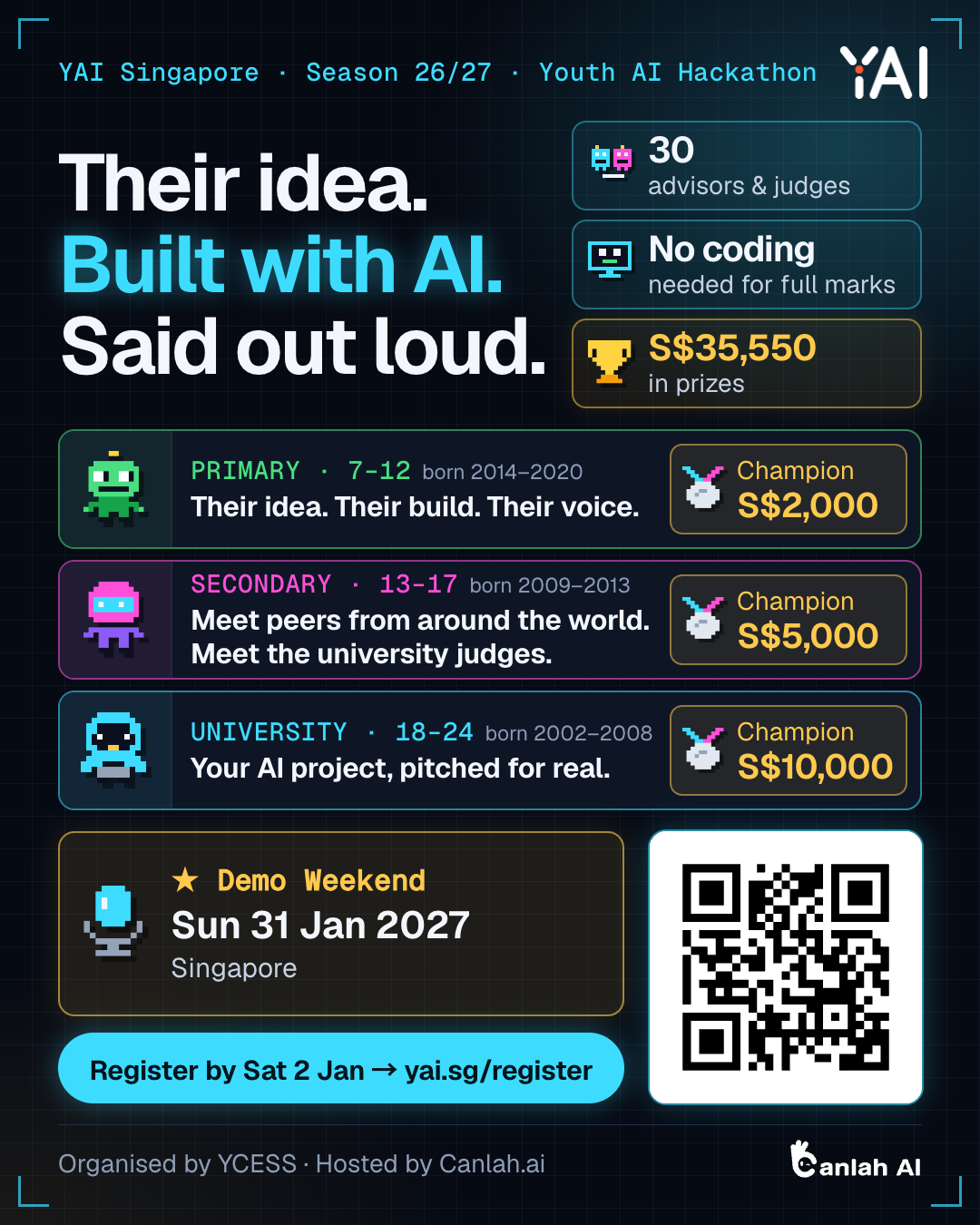
Register now, no cap, until Sat 2 Jan 2027, 23:59 SGT (Singapore time, UTC+8).

FOR PARENTS & TEACHERS

Your idea. Your build. Your voice.

For students aged 7–24, wherever they study, in three divisions judged separately. Demo Weekend is in person in Singapore. Adults can teach; the ideas, decisions and presentation are the students’.

Entry
S$68 per student · fee-waiver places
Prizes
S$35,550 in prizes · each division judged on its own
Register
Until Sat 2 Jan 2027, 23:59 SGT · teams of 1–4
Projects due
Sat 9 Jan 2027, 23:59 SGT
Demo Weekend
Sun 31 Jan 2027 · in person in Singapore
  • A parent confirms every place under 21
  • Player Cards show nicknames only: no photos, no schools
  • Organised by YCESS, a society registered in Singapore

FOR TEACHERS

Bring your class, club or CCA.

Free to print or forward to students and parents. We don’t need any student data from schools.

Your school’s own link: get a registration link and QR code in a minute, with a free place for one team for teachers using their school email address.

Comparing AI competitions? Our guide to AI competitions for students in Singapore sets out who can enter each one, alone or in a team, and which are open now.

Planning the school holidays? A December holiday AI project sets out what a team does, step by step, until the 9 Jan deadline. Child just finished PSLE? What to do after PSLE has MOE’s dates up to Secondary 1. In Computer Science Education Week (7–11 Dec), the free Hour of AI is a one-hour start at home.

Registering several teams? Register the first one, then press “Register another team”: your details stay filled in. Paying for several teams from one school? Email support@ycess.com with the team codes and we’ll send one PayNow request or invoice.

POWER-UPS

What registering unlocks

Pro tools, credits, discounts and prizes from 21 partners. Once your place is confirmed, your team page lists each one with its link or code and how to claim it. Some are for certain divisions or ages: each card says so.

  • Prize

    VIP memberships

    For every member of the top 3 teams in Secondary and University: 2 years, 1 year and 6 months.

  • For participants

    A free month of n8n Cloud Pro

    300 for eligible registered participants. Redeem by 20 Jan 2027.

  • SSOJetPrize

    5 SSOJet Business licences

    One year each, for the AI Agents quest winners.

  • For participants

    A free .xyz domain

    Free for the first year. 350 for eligible registered participants; under-18s through a parent or lead adult.

  • For participants

    Prune Pro

    Free until 9 Jan 2027 for eligible teams (18+), plus Best Use of Prune prizes of 12, 6 and 3 months of Pro.

  • For participants

    An Anvil educational licence

    Many of Anvil's paid features, for 100 registered participants until the end of February 2027. Under-18s join through a parent or school.

+15 more power-ups · see all 21Show fewer
  • For participants

    Supervisely computer-vision platform

    Free access for registered teams to label images and video for AI Robotics and AI for Good projects, 14 Dec 2026 to 9 Jan 2027.

  • SentiSight.aiFor participants

    €50 of SentiSight.ai credit

    For registered teams in every division, 1 Dec 2026 to 9 Jan 2027: label images and train image-recognition models online. €50 of credit per account; accounts are for ages 16+, so a teacher or parent creates the account for younger participants.

  • MagnificFor participants

    30% off Magnific Premium

    AI image generation and upscaling for the AI Art quest: 30% off the Premium monthly plan for University-division teams whose members are all 18 or over (no under-18 access, even through a parent). 50 uses, until 28 Feb 2027.

  • Prize

    Plasticity Studio licences

    For every member of the six winning teams in AI Art and AI Robotics & Smart Devices (one per division): up to 24 Studio licences for 3D design.

  • OSOYOOFor participants

    20% off OSOYOO robot cars

    For registered teams building for the AI Robotics & Smart Devices quest: 20% off any OSOYOO robot car. After the event, OSOYOO refunds the robot car in full for the top 3 AI Robotics & Smart Devices winners.

  • For participants

    PCBWay build funding

    Apply to PCBWay's Future Innovators Program: 50% of eligible manufacturing costs covered, up to US$200 (one application per person). The team that wins the Best Robotics & Embodied AI Award also gets US$120 of PCBWay credit.

  • For participants

    StoryMint free until 9 Jan

    AI storybooks for every student in a registered team: unlimited picture books and colouring books, 3 novels, 1 comic and PDF downloads until 9 Jan 2027, with a code of your own on your team page. 300 codes. Under-18 accounts are managed by a parent or teacher.

  • Rosebud AIFor participants

    150,000 Rosebud AI credits

    Make games with AI: 150,000 credits each for participants aged 13+ in Secondary and University, 200 packs. Claim once on your own account from 10 Dec; credits last a month from when you claim.

  • AuphonicFor participants

    25 hours of free Auphonic audio processing

    Clean, even sound for your demo video and pitch: sign up through the link on your team page from 10 Dec for 25 free hours, valid for a month after you sign up. Under-18s sign up with a parent.

  • Little LifeFor participants

    100 Little Life AI Academy accounts

    Accounts on Little Life AI Academy's AI learning platform, for registered participants to learn at their own pace.

  • Prize

    Fueler Pro for the winners

    For each member of the champion, first runner-up, second runner-up and Community Choice teams in every division: a Fueler Pro portfolio upgrade (US$100 at Fueler's price). After the event, each winner who wants it signs up on Fueler and sends Fueler their profile link.

  • MovaviFor participants

    Movavi Video Editor for your team

    Edit your demo video with Movavi Video Editor, including Templates & Effects: one activation key per team, on your team page, valid until 20 Jan 2027. 100 keys.

  • MakerzoidPrize

    Makerzoid Prize (opens in a new tab)
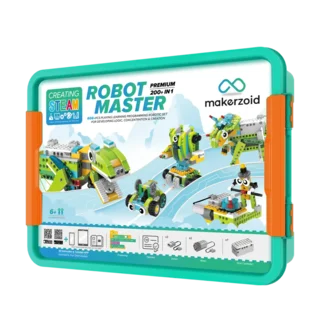
    Two Robot Master Premium kits for the best robotics project in the Primary division.

  • Prize

    AudioShake API credits or Studio

    For the AI Art winning team in each division: 500 AudioShake API credits or a 3-month AudioShake Studio subscription, the team's choice.

  • Prize

    A year of Mobbin Pro

    For each member of the University winning team in each quest who wants it: a year of Mobbin Pro (Mobbin accounts are 18+). After the event, with each member's OK, we pass their Mobbin email to Mobbin.

Codes reach registered participants on their team page; partners never receive student or parent lists. All partners ▶

HELP RULES

Help them learn, let them lead.

All help gets written down in the team's process log. That isn't a penalty. It's how judges see what your child did.

Adults can

  • Teach how a tool works
  • Explain ideas and knowledge
  • Help find and fix problems
  • For younger children, type or operate a tool as the child directs (parents, teachers and lead adults, not teammates)
  • Check wiring, batteries and safety

Adults can’t

  • Come up with the idea
  • Make the decisions
  • Build it for them
  • Present or answer questions for them

Teachers, parents, tutors and older siblings may teach tools, explain knowledge and help troubleshoot. Ideas, making decisions and the presentation are the students’. Disclosed help doesn’t cost marks when the ideas and decisions are the students’. Hidden adult work does. Rule 6 in full

SAFETY, DATA, MONEY

What we will and won’t do

Safety

Staff, judges and volunteers sign a code of conduct. None of them is ever placed alone with a child in a closed room. Sign-in, sign-out and authorised pick-up for younger children. Participants aged 18 or over follow the Code of Conduct's rules for adults.

Data

We never give partners student or parent lists, or who referred whom. A community partner only sees how many students joined and paid through its code or link, never who. Public results use display names only. Player Cards never show photos, real names or schools.

Money

S$68 per student (Singapore dollars), by PayNow from any Singapore bank app; from outside Singapore, by most international debit or credit cards. Please read the refund policy before paying: no refund if a student withdraws; a full refund if we cancel. Nothing else to buy: no kits, no paid tools, no random rewards.

Lead adults

Every team with a member aged 12 or under has a lead adult (a parent or teacher aged 21 or over) who comes to Demo Weekend whenever the team attends, and arranges pick-up.

Real people

Questions? Write to support@ycess.com. We reply within 2 working days (Singapore).

Do we need to buy a robot kit or paid AI tools?

No. A laptop, tablet or phone, paper, cardboard and free tools are enough. On-screen and simulated projects are judged the same as physical ones, and judges don't score device price or the number of tools.

No robot? No problem: any build counts

Player Cards and the YAI Ambassador Programme are optional: nothing to buy, one card per child, no random rewards. Cards are off unless you switch them on, and children aged 12 and under never see points and are never ranked.

Posting on social media is optional too. Under-13s never post from their own accounts; if you share for your child, the safe-share checklist covers faces, names and schools.

DIVISIONS

Which division is your child in?

Divisions go by birth year (the age you turn in 2026), not school year. A team plays in the division of its oldest member, and can play up into any older division for a bigger challenge. Turning 13 or 18 in 2026 (born in 2013 or 2008)? You fit two divisions this year, so you can also play in the one below: Primary or Secondary. Your child’s division decides who they compete with; their real age decides their consent and safety rules.

Find your division

Enter a date of birth. We work it out on this page and don’t save it.

Divisions go by birth year, not school year. Your team plays in the division of its oldest member, and can play up into any older division for a bigger challenge.

Every team with a member aged 12 or under has a lead adult (a parent or teacher) who comes to Demo Weekend whenever the team attends, and arranges pick-up. A parent confirms every place under 21.

Under 18 and playing up? Your child keeps every protection for their own age. If their team includes adult members, you see their display names and ages and agree to them separately: see rule 4.

Primary · Ages 7–12

Born
1 Jan 2014 – 31 Dec 2020 (ages 7–12 by birth year: the age you turn in 2026, with everyone born in 2020 counted as 7).
Playing up
Up for a bigger challenge? A whole team can play up into Secondary or University, and every child keeps the protections for their own age. Born in 2013? You can choose Primary too.
Lead adult
Every team has one: a teacher or parent aged 21 or over who isn't taking part this season. They register the team, look after safety, come to Demo Weekend whenever the team attends, and arrange pick-up.
Who confirms
A parent or guardian confirms each member's place.
Parents
You confirm your child's place. The lead adult registers the team, comes to Demo Weekend whenever the team attends, and arranges pick-up.
Projects look like
Songs, stories, videos, games, simple devices or anything else, with AI doing a job and a simple test.
Finalists on stage
5 min talk + 3 min Q&A

Secondary · Ages 13–17

Born
1 Jan 2009 – 31 Dec 2013 (ages 13–17 by birth year: the age you turn in 2026).
Playing up
Up for a bigger challenge? A whole team can play up into University. Primary teams can play up into Secondary too. Born in 2013? You can also play in Primary.
Lead adult
Needed only if a member is 12 or under by birth year (born in 2014 or later), for example a Primary team that plays up.
Who confirms
A parent or guardian confirms each member's place.
Parents
You confirm your child's place. If your child's team includes adult members (rule 4), you see their display names and ages and agree to them separately.
Projects look like
A prototype you can demo, with a test table and one round of improvements.
Finalists on stage
7 min talk + 3 min Q&A

University · Ages 18–24

Born
1 Jan 2002 – 31 Dec 2008 (ages 18–24 by birth year: the age you turn in 2026).
Playing up
The top division. Primary and Secondary teams can play up into it for a bigger challenge. Born in 2008? You can also play in Secondary.
Lead adult
Needed only if a member is 12 or under by birth year (born in 2014 or later), for example a Primary team that plays up.
Who confirms
Members aged 21 or over confirm their own place; a parent or guardian confirms for anyone under 21.
Parents
Members under 21 need a parent or guardian to confirm. Under 18 and playing up? Your parent confirms, and if your team has adult members, sees and agrees to them.
Projects look like
A working result, with a clear test method and known limits.
Finalists on stage
10 min talk + 3 min Q&A

DATES

The season, date by date

  1. Registration opens. The four quests are public. The build window opens for everyone.
  2. From Mon 19 OctYour full challenge, starter card and resource pack unlock on your team page once your place is confirmed.
  3. Sat 21 Nov – Thu 31 DecSingapore school holidays: the main build time for many teams. Studying somewhere else? Check your own term and exam dates; everyone has the same deadline.
  4. The submission form opens.
  5. We check the event conditions and email every registered team either way.
  6. Registration closes. Last moment to change track (one change allowed).
  7. Submissions close. Optional Reach Bonus posts need to be up by the same time.
  8. Sun 10 Jan, 12:00Reach Bonus: we count the likes on each team's chosen post, once. Rules are on the Judging page.
  9. Sun 10 – Tue 12 JanOnline screening of every valid submission.
  10. Every team hears by email, finalist or not (09:00), and every family gets a Demo Weekend RSVP (12:00).
  11. Demo Weekend: finalists present live, then every team may exhibit; Community Choice; awards for every division. Every participant is welcome.
  12. After Demo WeekendParticipation e-certificates emailed to every team member with a valid submission.
  13. Prize money paid to winning teams.

Questions from parents

P-2Which division is my child in? Can siblings be on one team?

Divisions go by birth year (the age you turn in 2026), not school year: Primary 7–12 (born 1 Jan 2014 – 31 Dec 2020), Secondary 13–17 (born 2009–2013), University 18–24 (born 2002–2008). So everyone born in 2014, P6 in Singapore this year, is in Primary, and JC1, poly and ITE students born in 2009 are in Secondary. Use the calculator on the home page. A team plays in the division of its oldest member. Turning 13 or 18 in 2026 (born in 2013 or 2008)? You fit two divisions this year, so you can also play in the one below: Primary or Secondary. Siblings can team up across two neighbouring divisions: a 10-year-old and a 14-year-old play in Secondary. A sibling aged 13–17 can also team up with an older sibling aged 18–24 in University, with a parent's OK, if the younger one is at least 13 when the team registers.

P-24Can my child play up?

Yes. A whole team can choose to play up into any older division for a bigger challenge: a Primary team can take on Secondary or even University, and a Secondary team can take on University. Born in 2013 or 2008? You can also play one division down. Your child keeps every protection for their own age: a lead adult for ages 12 and under and a parent's confirmation. Playing up earns no extra marks: judges score the project against that division's requirements, with no bonus or penalty for being younger.

P-25Can a university student team up with a secondary school student?

Only if every under-18 member was born within two years of every adult member, for example JC or poly schoolmates, or if they're family, such as siblings or cousins. For this rule, under 18 means under 18 on Mon 19 Oct 2026. The under-18 member's parent sees the adult teammates' display names and ages and agrees to them separately, and adult members follow the Code of Conduct's rules for adult participants. An adult member can't register the team or pay for it. Full details are in rule 4.

P-3What does S$68 cover? Is there anything else to pay?

S$68 per student (Singapore dollars) covers the challenge and resource pack, screening and judging, and certificates for every student, finalist or not, plus Demo Weekend entry and student lunch for those who come to Singapore. There's no other entry fee. You won't need to buy kits or paid tools; free tools can score full marks. Not included: devices, travel (including flights, visas and accommodation for teams from outside Singapore), and lunch for accompanying adults.

P-4How do fee-waiver places work?

About 15 places are free for students who need financial support. Say yes to "apply for a fee waiver" when you confirm your place, then email support@ycess.com with your team name and proof of financial help from your school, local council or government, or a short note from a teacher. Asked by mistake? Email us and we'll withdraw it. No bank statements. Two staff members review it privately, and judges and partners are never told. Your registration stays open while we review, and your team's challenge unlocks once every confirmation is in, without waiting for the result. Fee-waiver places are open to every division, including University.

P-6What's the refund policy?

If a student withdraws, the fee isn't refunded. If we cancel the event, you get a full refund, and your child's project stays theirs. If we postpone it, you can keep your place or take a full refund. Refunds are limited to the fee paid, and we aim to process them within 14 days of receiving what we need. Not being chosen as a finalist isn't a refund case: the fee covers the resource pack, screening and judging, and certificates for every student, plus Demo Weekend entry and lunch for those who come. Full details are on the Refunds page.

P-8How much can I help my child?

You can teach tools, explain ideas and help troubleshoot. The idea, the decisions and the presentation must be your child's. For younger children, you may type or operate a tool as your child directs. Please write down all help in the process log. It's not a penalty; it helps judges see your child's own work.

P-22My child is 8. Can they build an AI teammate?

Yes. They can build it on your own account on an AI platform such as ChatGPT or Gemini, as a demo you run with them; they don't need an account of their own. Or they can make a Pick-the-answer teammate: your child writes every answer the teammate can give, and the AI picks which answer fits each request. Both can earn full marks. You may type or click; your child chooses every word and every rule. Plan on about 4 hours of an adult's time across the project, including running the demo and being a tester.

P-23Can my child's AI teammate be their friend?

No. A teammate has a job, like a homework coach or a club helper. It must say it's an AI, and its role can never be a friend, buddy, pet, girlfriend or boyfriend, or counsellor. If someone seems upset, the teammate's job is to point them to a trusted adult.

P-9Is it safe? Who's with my child at Demo Weekend?

Staff, judges and volunteers sign a code of conduct, and none of them is ever placed alone with a child in a closed room. Children aged 12 or under have a lead adult present, with sign-in, sign-out and authorised pick-up each day. You can also come as the accompanying adult. The University division has participants aged 18–24. Adult participants follow the Code of Conduct's rules for adults, and under-18s and adults team up only in the ways set out in rule 4.

P-10Will photos or videos of my child be used?

Yes. Photos, video and recordings from YAI events, submissions and any later YAI filming, and your child's project, may be used to promote and advertise YAI in any media, as set out in section 8 of the Rules & Agreement; confirming your child's place gives that permission. We never publish birthdays, contact details or other personal data with them, and under-18s are named only by display name. To stop a photo or clip being used in new material, email admin@ycess.com. On the day, you can still ask for a red lanyard at check-in and our photographers will avoid featuring your child.

C-10Does my child have to post on social media?

No. Posting is optional, and nobody has to post; teams that don't post are judged exactly the same on the five criteria. Under-13s don't post from their own accounts: a parent or the school can post for the team. No faces of under-13s without a parent's OK, and never school names, full names or locations. See Share your build.

P-11Who owns my child's project?

Your child and their team. YCESS only gets a non-exclusive right to show and promote the project for YAI. We never pass it to partners for commercial use or AI training. Any third-party material keeps its own licence.

P-12Will sponsors get our contact details?

No. We never give partners student or parent lists, or who referred whom. If you pick a community partner's referral code on the form (its own link picks it for you), the form tells you first; that partner only sees how many students joined and paid through its code or link, never who, and may receive part of the fee as thanks if your team pays. You pay the same either way. If a partner has a booth at Demo Weekend, whether you leave your details there is entirely up to you.

P-14Does taking part help with school admissions?

We don't promise any admissions outcome, scholarship, official certification or entry to other competitions. Certificates record what your child did; how any school treats them is up to that school. What your child gets is a project they made themselves and the experience of explaining it.

Guide: DSA for robotics, coding and STEM

P-16Is this an all-night hackathon?

No. Students build at their own pace during the season, at home or at school. Demo Weekend is a single day, Sun 31 Jan 2027, held in the daytime, with no building on the day.

Guide: What is a hackathon?

P-17Can I come too? Is lunch provided for me?

Yes. Each student may bring one accompanying adult, who sits in the audience and can't answer for the student. Lunch is provided for students only, so please bring or buy your own.

P-18Will every team present on stage? Could we not be chosen?

Not every team. Registration has no cap, so we choose finalists: after an online screening from 10 to 12 Jan, 3–5 finalist teams per track in each division present live on Sun 31 Jan. We can't know in advance how many teams will take part, so we can't promise any team a place in the finals. Whatever the result, every valid submission receives a certificate, every participant is welcome at Demo Weekend, and every team may exhibit its project on Sunday.

For teachers & schools

T-1Does our school need to register or collect fees?

No. YAI is an out-of-school programme organised by YCESS. Families register and pay for their own teams. Schools can simply share the information if they wish.

T-2Can I be a lead adult? Can I lead several teams?

Yes. Every team with a member aged 12 or under by birth year (born in 2014 or later) has a lead adult, whatever its division: a teacher or parent aged 21 or over who isn't taking part this season. A lead adult registers the team, looks after safety, comes to Demo Weekend whenever the team attends, and arranges pick-up. One teacher may lead more than one team, as long as they can be there for all of them.

T-3How much can I help as a teacher or CCA coach?

The same as parents: teach tools, explain ideas, help troubleshoot. The ideas, decisions and presentation are the students'. Each team's project must be its own; don't pass one team's idea or code to another. Help should be written in the process log. If you also review or judge for YAI, you'll step aside from teams you know.

T-4Can I form teams from my class or CCA? Can they mix schools?

Yes. Each team has 1–4 members and plays in the division of its oldest member, or any older division it plays up into. Cross-school teams are welcome. A student can be on more than one team if each team pays the fee for them; a free or fee-waived place covers one team only. Students under 18 and adults team up only as set out in rule 4.

T-5Can the school pay fees for its students?

Fees are usually paid by each team's representative. If your school would like to cover fees for its teams, please email support@ycess.com before registering. Students who need financial support can apply for a fee-waiver place with proof of financial help from their school, local council or government, or a short note from a teacher.

T-6Does it clash with exams or term time?

The build window runs from Mon 19 Oct 2026 to Sat 9 Jan 2027. For MOE primary and secondary schools, the main build time falls in the year-end holidays (21 Nov – 31 Dec; for JC1 students, from 28 Nov). Term 1 starts on Mon 4 Jan, the week before the deadline, so we suggest teams finish during the holidays. Demo Weekend is the second weekend of term. Students sitting O- or A-Level exams should put their exams first. Polytechnic, ITE and university students: please check your own exam and term dates. Schools outside Singapore: please check your own term and exam calendar; the build window and deadline are the same for everyone.

T-7Can we get materials to share?

Yes. Email support@ycess.com and we'll send an A3 poster with a QR code for your school, in English or Chinese, and a short message for class groups. The teacher one-pager (English and Chinese), a class introduction and the posters are also on For parents & teachers, free to print or forward. We don't need any student data from schools.

T-9I help run YAI, or I'm a judge or reviewer. Can my child or relative take part?

Yes, if they tell us when they register. You'll step aside from anything to do with their team. People who can see unpublished challenges or scores (YAI staff, interns and volunteers, judges and screening reviewers) can't take part themselves.

Guides for parents: What is a hackathon? · Competitions for primary school pupils · AI for kids: where to start · ChatGPT age limit: is it OK for kids? · DSA for robotics, coding and STEM · Robotics competitions for kids and students in Singapore · Coding competitions for students in Singapore · Art competitions for kids in Singapore · All guides

All FAQs · Code of Conduct · Privacy · Refunds

Schools and clubs: bring 30 students ▶